Your price list, as a calculator on your website.
Upload the price list you already have and the builder fills in your prices. Couples pick how many of each piece they want and send you an inquiry with an estimate already on it. The one below is the real calculator, set up for a florist I made up.
$497 once, no monthly fee. See what's included

Built by Brian, in Orlando.I answer within two business days.
Try the calculator
Starting looks:
Larkspur & Fern is a made-up florist with invented prices. On your website it shows your own prices, in your colors and fonts. The send button here opens your email app addressed to a made-up address, so nothing reaches anyone.
Price and what you get
$497one time, no monthly fee
Get the calculator, $497For US businesses. If it won't run on your website, email me within 14 days of buying and I refund you in full. License terms
- The builder, one file on your computer that you keep
- 10 price-list uploads read for you
- A free way to fill it in with your own ChatGPT or Claude
- Three starting looks, or your exact brand colors and fonts
- Sales tax, fees and a floral minimum
- Setup steps for five website builders
Before you buy, check your plan
The calculator is code you paste onto a page. Some website plans don't allow that.
| Squarespace | A Core, Plus or Advanced plan. The Personal plan can't run pasted code. |
|---|---|
| Wix | Any plan, the free one included. |
| WordPress.com | A plan that lets you add plugins. |
| WordPress on your own hosting | Paste it while signed in as an administrator. |
| Showit | Any plan. There is no free one. |
| Shopify | Any plan. There is no free one. |
This is how each website builder describes its own plans, as I read them in October 2026. The setup steps for each one are on the help page.
Show a range, and keep your consultation
A lot of florists keep prices off their website, worried that a number will scare couples off or let them skip the consultation. You decide how much this one shows.
- A range instead of one total
- Couples see something like "$3,391 to $4,144" instead of one exact total. You pick how far below and above it goes. The demo above has it switched on.
- Priced at your consultation
- Mark the pieces you only price in person, like an arch or a sweetheart table. Couples can still ask for one, and it adds nothing to the total.
- Your floral minimum
- Say it in your own words as a note under the total, or have the estimate raised to your minimum.
- Your own fine print
- The line under the total is yours, such as "This estimate is based on average pricing. Your proposal follows your consultation."
You don't type your price list again
If your prices already live somewhere, like a Canva PDF or your pricing page, step 2 of the builder starts from that instead of a blank page.
- Upload your price listA PDF, a photo of your price sheet, or a link to your pricing page. Ten uploads come with your purchase, up to five a day.
- Use your own ChatGPT or ClaudeThis way is free and has no limit. Copy one instruction into it along with your list, then paste its answer back.
- Type or paste it inPaste rows straight from Google Sheets or Excel, or type them one at a time.
Every way lands on the same screen, where you check each row before anything reaches your website.
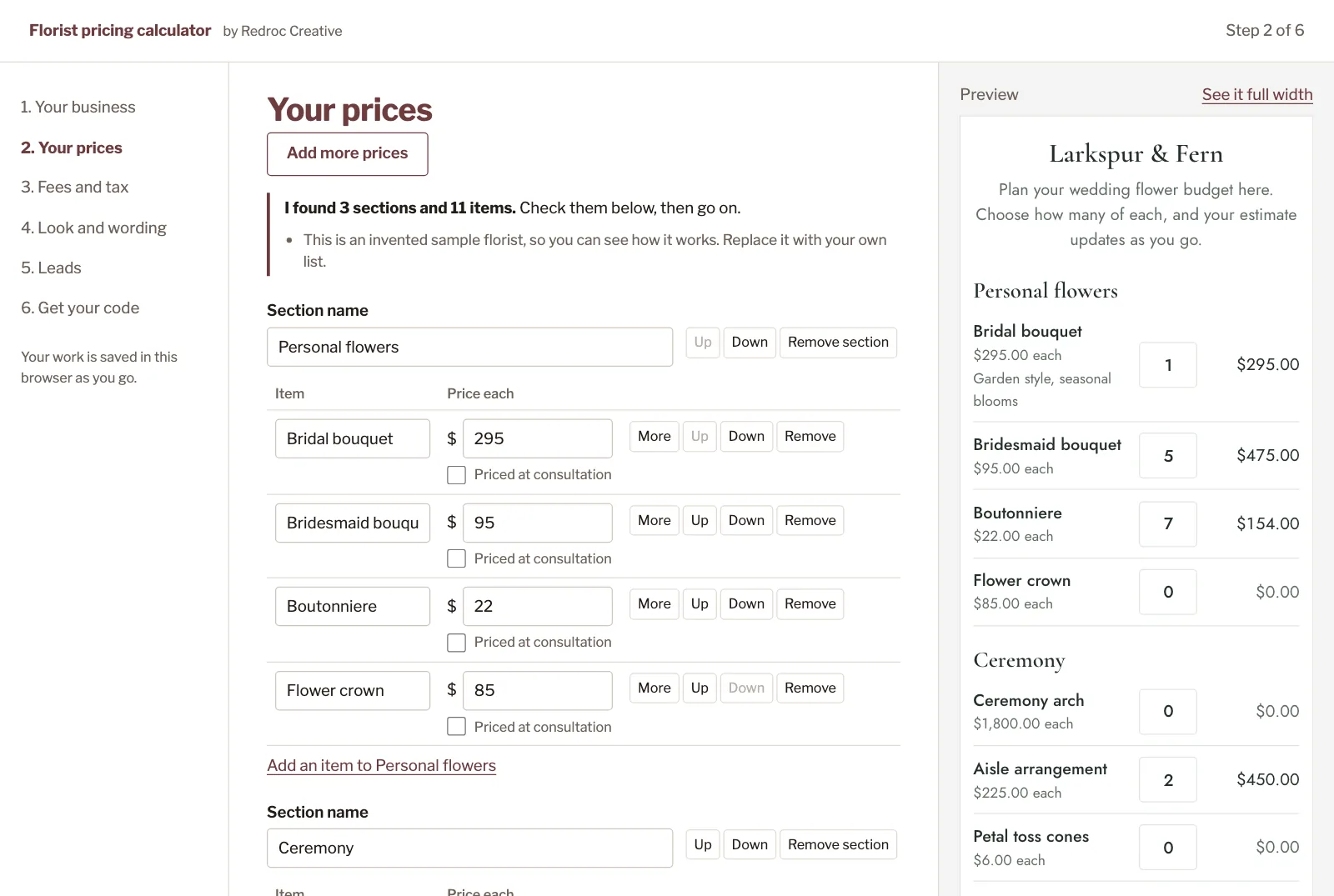
From your price list to your website
Here's one set up start to finish, for a florist I made up, from her PDF price list to a live WordPress page.
- Your business
Your name and the email address that inquiries go to.
- Your prices
Your sections and items, whether you price by the stem or by the arrangement. Anything you only price in person can say "priced at your consultation".
- Fees and tax
A design or delivery fee as a percent or a flat amount, your sales tax, a floral minimum in your own words, and a range instead of one number if you prefer.
- Look and wording
Your colors, any Google font or your website's own fonts, corners and buttons, and every word couples read.
- Leads
The email button always works with no setup. An optional form sends inquiries straight to your inbox.
- Get your code
Copy it and paste it into a code or embed block on your page. The help page shows where it goes on your website builder.
When it's not the right fit
I'd rather you find out here than after you've paid.
- You quote every wedding from scratchIt multiplies a set price by how many a couple wants. If none of your prices are set ahead of time, it has little to work with.
- You want a deposit taken onlineIt collects the couple's list, not money. You send your proposal and invoice the way you do now.
- You want changes to reach your site by themselvesYour website keeps the copy you pasted. To change a price, you paste a new copy. That is what keeps it free of a monthly fee.
- Your website plan won't run pasted codeSee the plan table above. Upgrading your plan is between you and your website builder.
- Your business is outside the USIt is sold to US businesses only for now. If you buy from outside the US, I refund you in full.
Questions
Do I need to know code?
No. You fill in the builder and copy the code it gives you. Pasting that code onto a page is the only step that touches your website, and the help page shows where it goes on Squarespace, Wix, Showit, WordPress and Shopify.
What happens right after I pay?
Stripe sends you to a page with your license key and the builder to download. An email follows with your key and the builder attached. Keep that email: it is how you change your prices later.
What happens to my price list when I upload it?
It goes through my server to Anthropic, the company that makes Claude, which reads it and fills in your rows. My server deletes the file once it has been read. If you would rather it never leaves your computer, use your own ChatGPT or Claude, or paste it in.
What if I use up my 10 uploads?
Use your own ChatGPT or Claude instead, which is free and has no limit, or paste your rows in. One upload reads a whole PDF of up to 10 pages.
Can I change my prices later?
Any time. Open the builder file from your purchase email, paste in the code from your website, change what you need, and paste the new code over the old. There is no login, because there is nothing for me to host.
Where do the inquiries go?
The email button opens the couple's own email with their flowers and estimate filled in and addressed to you. If you'd rather inquiries reach you with one press, turn on the optional form. It uses Web3Forms, which gives you a free key in about five minutes and takes up to 250 inquiries a month on its free plan. When a couple presses Send, the inquiry comes to you first, then their own email opens so they keep a copy.
Can couples print their estimate?
Yes. "Save or print" makes a clean sheet with your name, only the flowers they picked, and the totals. Wix runs pasted code in a box that blocks printing, so on Wix the calculator says so and couples email or copy their list instead.
Will it look like part of my website?
It can, and step 4 is where you make it match. Start from one of three looks, or set each of its seven colors yourself, with a color picker or your exact brand color codes. Then choose any Google font or your website's own fonts, the corners, filled or outlined buttons, the spacing and the width. It sits in its own box on your page, so your theme can't restyle it and the rest of your page stays as it was.
Does it cost anything after I buy?
Not from me. The optional form is free up to 250 inquiries a month. Your website builder's plan is the one cost to check, in the table above.
Will it keep working?
Yes. Once it is on your website it loads nothing from my server, so it keeps working even if I stop selling it. Only the upload reading uses my server.
What if it won't work on my website?
Email me at brian@redroccreative.com within 14 days of buying and I refund you in full.